





Usage of Semaphores and Mutexes
Contents
Setup
For this lab, you will need a Xilinx Zybo Z7-20 FPGA Board and a USB cable. Connect the USB cable to the PC and the Zybo Z7-20 board to connector PROG/UART. With this cable, the programming of the FPGA will be done, as well as serial communication between the board and PC.
Description
Based on the hardware and operating system from the previous lab, develop a multi-threaded application demonstrating the usage of both semaphores and mutexes.
The application shall emulate the operation of a four-floor elevator.
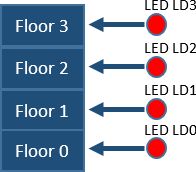
Hardware
Add GPIO peripherals in Vivado and connect:
- Push-buttons BTN0-BTN3 for calling the elevator to floors 0-3.
- Four user LEDs LD0-LD3 for indicating the current elevator position.
- RGB LED for indicating the elevator state
Use Connection Automation to connect the peripherals to the processing system.
Elevator Operation
Create the following threads:
1. Elevator Controller Thread
- Waits for elevator requests.
- Processes requests in the order they arrive.
- Controls LEDs and elevator movement.
2. Button Handling Threads
- Monitor buttons BTN0-BTN3.
- When a button is pressed, generate an elevator request by signaling the appropriate semaphore.
3. Status Display Thread
-
Periodically displays elevator status on the UART terminal.
Elevator Timing
- Elevator starts at Floor 0.
- Time to travel between adjacent floors: 2 seconds.
- Door opening time after arrival: 3 seconds.
- Status update period on UART: 1 second.
Task Timing
- Button polling thread: 50 ms
- Elevator controller thread: event-driven (waiting on semaphores)
- Status thread: 1000 ms
- LED update: immediately after floor change
- The Status Thread should print every second:
Current floor: 0, State: IDLE
Current floor: 0, State: MOVING
Current floor: 1, State: MOVING
Current floor: 2, State: MOVING
Current floor: 3, State: DOOR OPEN
Current floor: 3, State: IDLE
Semaphores
Use semaphores to signal elevator requests.
For example:
- BTN0 requests Floor 0.
- BTN1 requests Floor 1.
- BTN2 requests Floor 2.
- BTN3 requests Floor 3.
When a button is pressed, the corresponding semaphore should be released. The Elevator Controller Thread should remain blocked until a request is received.
Elevator Visualization
The current floor shall be indicated using LEDs:
Only one LED should be on at a time.
When moving between floors, the elevator shall pass sequentially through intermediate floors with a visible delay (e.g. one second).
Example:
Current floor = 0

BTN3 pressed
  ↓
Semaphore posted
  ↓
Elevator Thread wakes up

LED0 ON
RGB = GREEN

Move to Floor 1
LED1 ON

Move to Floor 2
LED2 ON

Move to Floor 3
LED3 ON

RGB = RED
Doors Open

RGB = BLUE
Idle
RGB LED State Indication
Use the RGB LED to indicate elevator state:
- Blue = Idle ●
- Green = Moving ●
- Red = Door Open ●
Example:
Blue -> waiting for request
Green -> elevator moving
Red -> elevator arrived
Blue -> waiting for next request
Mutex
The Elevator Controller Thread and Status Display Thread shall both write messages to the UART terminal.
Use a mutex to protect UART access.
Demonstrate the operation:
- without a mutex,
- with a mutex.
Without the mutex, messages may become corrupted due to simultaneous access:
Elevator moCurrent floor = 2
ving to floor 3
With the mutex:
Elevator moving to floor 3
Current floor = 2
Results required to complete the exercise
Demonstrate the operation of the software on the Zybo Z7-20 platform and explain the role of synchronization mechanisms.
The demonstration must show:
- Elevator movement between floors.
- Correct visualization using LEDs and RGB LED.
- Semaphore-based signaling of elevator requests.
- UART output without mutex protection.
- UART output with mutex protection.
- Explanation of the difference between semaphore and mutex usage in the developed system.
Students should be able to explain:
- why semaphores are used for event signaling (elevator requests),
- why a mutex is required to protect the shared UART resource.
Change history
Adaptation to version Vivado 2018.3: M. Wójcikowski (08/2020).
Projekt: „Inżynier 5.0 - kształcenie na potrzeby gospodarki”
współfinansowany przez Unię Europejską ze środków Europejskiego Funduszu Społecznego Plus w ramach programu Fundusze Europejskie dla Rozwoju Społecznego 2021-2027 nr umowy o dofinansowanie FERS.01.05-IP.08-0285/23-00